
the amazing digital fly - Browser Fly Sandbox
the amazing digital fly is an interactive browser sandbox where you explore a Digital Circus-inspired building, inspect flies, switch viewpoints, and test builder tools.
Related Games












About the Browser Fly Sandbox
- Category
- Arcade Games
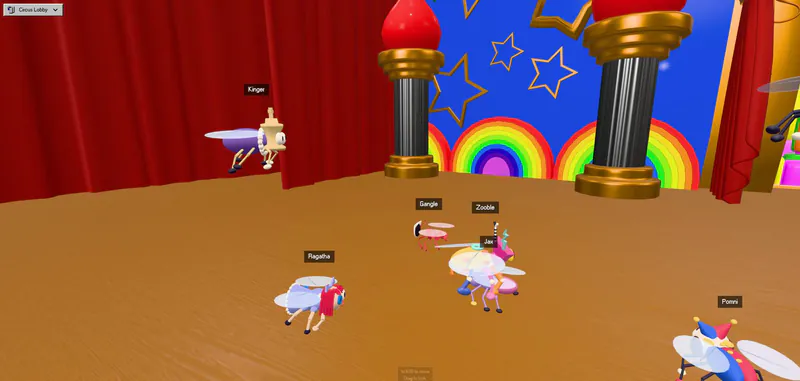
This browser-based exploration toy is built around tiny creatures, a strange abandoned building, and the Digital Circus Mainframe. Its surface is easy to enter, but the simulation rewards players who inspect flies, compare camera views, and try the builder. The project draws inspiration from fruit-fly simulation and connectomics research while keeping its characters and brain activity simulated for play. Use it as a freeform discovery sandbox: follow a fly, inspect its circuit, draw scent, or rearrange the environment.
How to Play the amazing digital fly
Controls
Look around the abandoned C&A Building first, then try orbit, overhead, follow, or fly-perspective cameras to understand how the scene is arranged. A quick click on a fly or nametag opens a closer look at its simulated neural activity. When you want to experiment, open Builder mode to add and transform objects, change physics, or edit a fly. Drawing scent adds another playful way to change the scene. The experience is presented as an unofficial fan simulation with fictionalized behavior, not as an official Digital Circus release.
Game Features
- Freecam exploration of an abandoned building
- Orbit, overhead, follow, and fly viewpoints
- Fly and nametag inspection with neuron details
- Object placement, transform handles, and physics toggles
- Editable fly properties in Builder mode
- Scent drawing for experimental play
Digital Fly Gameplay Videos & Walkthrough Guides
A quick video introduction to the fly sandbox and its unusual interactive scene.
Digital Fly Sandbox FAQ
What do you do first in the browser sandbox?
Explore the abandoned C&A Building from the human viewpoint, then switch camera modes or click a fly to discover the simulation layers.
Which controls are useful for a quick start?
WASD moves, Q and E change height, Shift speeds up travel, and dragging changes the camera view while you explore the building.
Does the game have a fly-perspective camera?
It does. The camera menu also includes orbit, overhead, and follow views for comparing the same environment from useful angles.
Can I edit the environment?
Builder mode lets you add objects, move or rotate them, scale them, toggle dynamic physics, and adjust fly properties for experiments.