
human atlas vercel - 3D Anatomy Viewer
human atlas vercel is an interactive 3D anatomy viewer where you can search structures, switch body systems, change camera views, and pull pieces apart.
Related Games
























About the 3D Anatomy Viewer
- Category
- Simulator Games
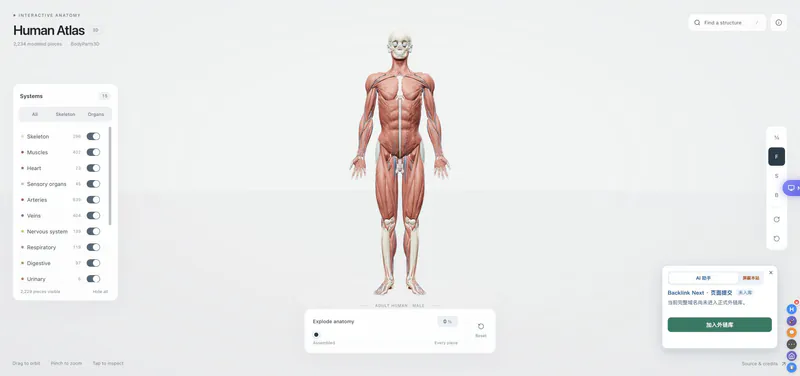
This browser-based 3D model is built from the ashemag Human Atlas project. It organizes 2,234 modeled pieces into 15 systems and gives each structure a searchable place in the model. The live viewer is useful for a quick visual tour, while the related GitHub project explains the BodyParts3D adult male reference and the project's open-source attribution. Explore layers, search for heart or other named structures, and use the exploded view to understand how the pieces sit together.
How to Play the human atlas vercel viewer
Controls
Use the assembled view as a starting point, then orbit and zoom until the body is easy to read. The search box is the fastest route to a named structure; selecting a result opens its description and lets you isolate it. Try the system buttons to reduce the model to the layers you care about, then move the explode slider to see the pieces separate. Camera presets help you compare the front, side, and back without manually repositioning the view. It is an educational anatomy viewer rather than medical advice.
Game Features
- Browser-based 3D anatomy viewer
- Search for named structures such as heart
- System visibility buttons for major anatomy layers
- Front, side, back, and reset camera controls
- Exploded view for separating model pieces
- 2,234 BodyParts3D-based modeled pieces
3D Anatomy Viewer Videos & Walkthrough Guides
A short visual tour of the searchable 3D atlas and its exploded layout.
3D Anatomy Viewer FAQ
What can I explore in Human Atlas Vercel?
The viewer contains 2,234 modeled pieces arranged across 15 anatomical systems in an interactive 3D body you can orbit and inspect.
How does anatomy search work?
Search a named structure, choose the matching result, and open its detail card to see a description, reference, and selected-piece count.
What is the explode control for?
It spreads visible anatomy pieces apart so you can inspect how the layers fit together, while an isolated selection keeps attention on one structure.
What anatomy reference does the viewer use?
The project uses an adult male BodyParts3D reference and explains its open-source application and anatomy-data attribution in the related GitHub materials.