

Dig and Clean - Roblox Digging & Cleaning Tycoon
Dig and Clean is a Roblox digging and cleaning tycoon where you uncover buried treasure, wash away the dirt, improve your tools, and fill a personal museum with rare finds.
Related Games
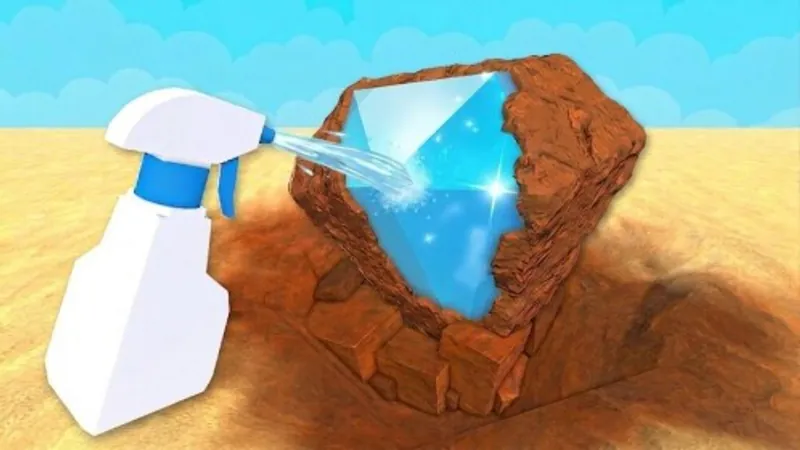
Open the Roblox experience to dig, clean, upgrade your tools, and curate your museum.
Play Dig and Clean on RobloxA Roblox account and a supported Roblox app or browser launch flow may be required.














About the Roblox Digging & Cleaning Experience
- Category
- Simulator Games
- Platform
- Roblox
- Mode
- Simulation / Tycoon
- Developer
- Squeaky Clean!
Dig and Clean is a Roblox Simulation experience in the Tycoon subcategory, created by the Squeaky Clean! community. Its main loop links discovery and collection: dig up dirty junk and buried treasure, clean the items to reveal them, then choose what belongs in your museum. The museum gives the search a long-term purpose, while upgradeable shovels and spray bottles help you work toward better finds. The official experience supports mobile, tablet, computer, and console play, with servers sized for up to six players.
How to Play Dig and Clean: Uncover and Curate Rare Finds
Controls
Start in the Roblox experience and look for dirty junk or treasure buried in the dig area. Work through each find, spray it clean, and inspect the result so you can decide which discoveries are worth keeping. As your collection grows, place your best items in your museum and use the loop to improve your shovel and spray bottle. Chasing rare finds gives the tycoon-style progression a clear goal, while a tidy display helps you see what you have already uncovered. The experience runs on Roblox across mobile, tablet, computer, and console. On a phone or tablet, use the on-screen controls and gestures; on desktop, use Roblox's standard keyboard and mouse help for movement and camera adjustments.
Game Features
- Dig up buried junk and treasure across the Roblox experience
- Spray dirty discoveries clean to reveal what you found
- Search for rare items and build a collection worth displaying
- Curate your best discoveries in a personal museum
- Upgrade your shovel and spray bottle as the collection grows
- Dig and Clean progression combines Simulation and Tycoon systems around collecting and improving tools
- Play on mobile, tablet, computer, or game console
- Share a server with up to six players
Dig and Clean Gameplay Videos & Walkthrough Guides
Watch gameplay, a beginner-friendly guide, and quick tips for digging, cleaning, collecting, and upgrading in the Roblox experience.
Digging & Cleaning FAQ
What do you do in this digging and cleaning tycoon?
You dig up dirty junk and buried treasure, spray each discovery clean, and search for rare items that can become part of your growing collection.
How does the museum fit into progression?
In Dig and Clean, the museum turns individual finds into a longer collection goal. Display your best discoveries there, then keep improving your shovel and spray bottle to pursue better items.
Which devices support the Roblox experience?
The official Roblox description lists mobile phones, tablets, computers, and game consoles. The exact layout and available input method depend on the device you use.
How many players can share a server?
The current Roblox listing shows a server size of six, so a single experience server can host up to six players while you dig and collect.
What controls should I use?
Desktop players should use Roblox's standard keyboard and mouse controls, while mobile and tablet players use the platform's on-screen movement controls and gestures.
Does the experience support voice chat or camera features?
The current Roblox listing marks both voice chat and camera as unsupported for this experience, so the main loop uses the regular Roblox input and interface controls.