

coer id cortis brasil - Make a Personalized Member Card
coer id cortis brasil turns a CORTIS member choice into a personalized identity card with a live preview and a simple restart loop.
Related Games















About This CORTIS Brasil Identity-Card Activity
- Category
- Simulator Games
- Platform
- Web browser
- Mode
- Interactive member-card creator
- Developer
- CORTIS Brasil
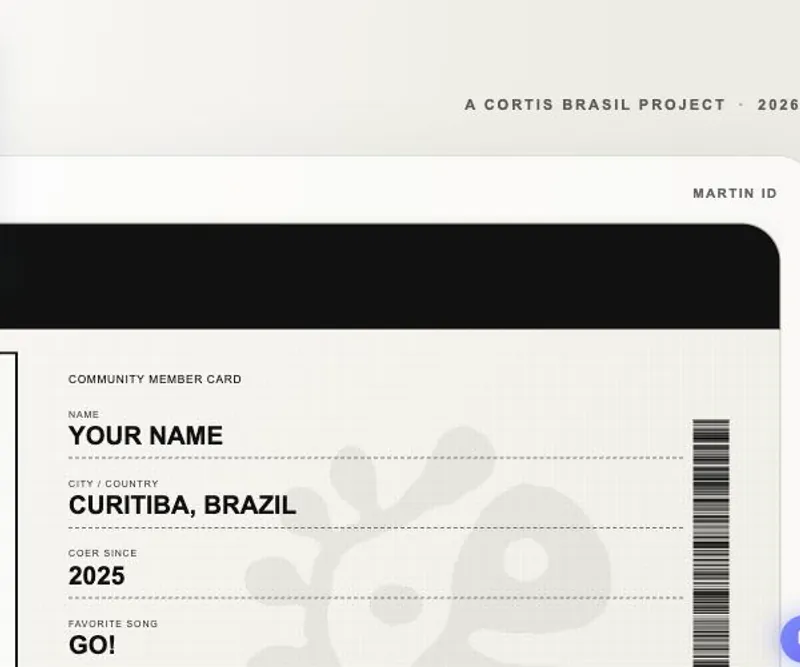
COER ID — CORTIS Brasil is a compact visual builder for creating a member-style identity card in the browser. Its appeal comes from seeing the card respond immediately as you switch members and adjust the details. The flow stays approachable: make a few choices, inspect the finished preview, and either use the download action or clear the design for another combination.
How to Play coer id cortis brasil: Personalize the Preview
Controls
Pick a member first, then fill in the short identity fields. The COER Since menu offers 2025 and 2026, while Favorite Song lets you choose the track that appears in the finished design. Use the live preview as your guide while you make changes. When the portrait, name, location, year, song, and signature look right, use Download My COER ID; Make Another gives you a clean second attempt.
Game Features
- Five member portraits to start from
- Immediate preview updates as details change
- Name and location lines for the card
- Two COER since year options
- Favorite-song selection for extra personalization
- Download My COER ID and Make Another actions
Personalized COER ID Questions
What can I create with COER ID — CORTIS Brasil?
You can create a personalized CORTIS member identity card in the browser by choosing a portrait, entering details, and checking the changing preview.
What details can I personalize?
Add a name and city or country, then select a COER since year and favorite song. Those choices appear alongside the selected member in the card preview.
Where can I see my changes?
The live preview shows the selected member image, ID number, name, location, year, favorite song, and signature as you work through the form.
How do I create a second version?
Use Make Another after the first design to clear the current setup, then select a member and enter a new combination of card details.