
HR Life Game — Play Online
Play HR Life Game online in your browser. Run a Malaysian HR office by answering staff cases, calculating payroll, managing stress and rising from Intern to CHRO.
Related Games














About HR LIFE 2.0
- Category
- Simulator Games
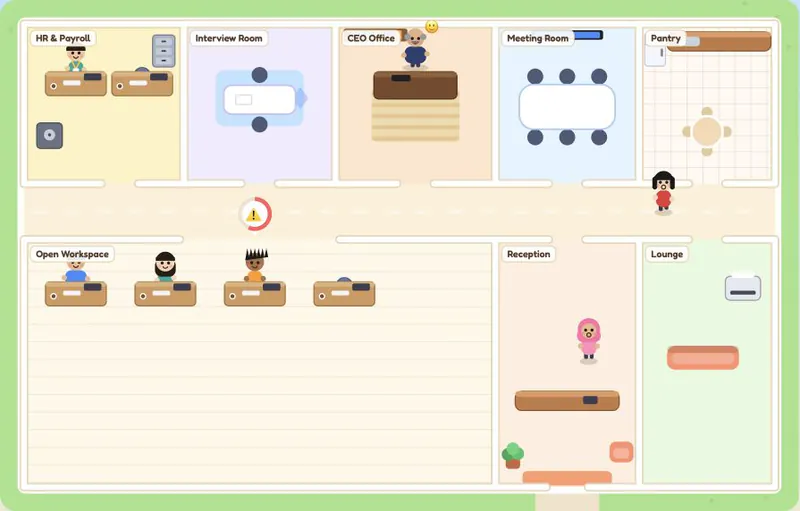
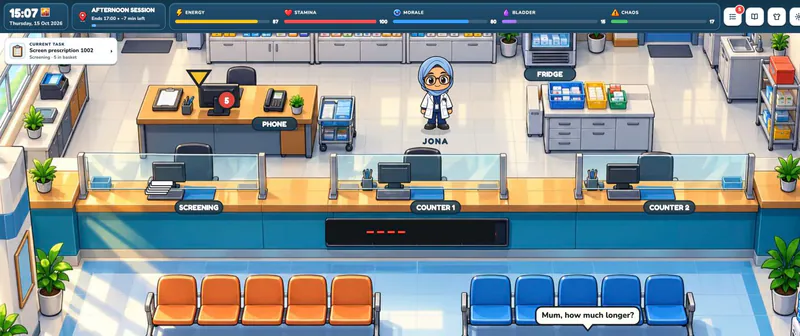
HR LIFE 2.0 is an office management simulation about the small decisions that keep a workplace running. You work through a Malaysian office, respond to staff problems, handle payroll and manage interruptions while keeping stress under control. Cash is shown in RM, and the game is available in English and Bahasa Melayu.
A standard workday runs from 09:00 to 18:00 in about five real minutes. The office moves at a busy pace, but the pause while you read a case gives you time to weigh your answer. Three daily goals add another layer of planning, since completing useful work can also bring you closer to specific rewards.
The job grows as you progress. Recruitment begins on Day 2 with CV review, interviews and salary offers. Show-cause letters arrive from Day 3 and involve several steps and follow-up. Ranks, badges, reviews and furniture upgrades give your office goals that extend beyond a single shift.
Treat the payroll scenarios as game challenges, since their contribution rates are simplified. If you want to keep your progress, keep playing on the same device, and plan around the fifteen-minute office break that follows every three workdays.
How to Play HR Life Game
Controls
Click Play Now above, choose English or Bahasa Melayu, and start as a guest if you want to jump straight into a shift. When ticket bubbles appear over staff or rooms, click or tap one and let your character walk to it. Read the full case before you choose a response, because the workday clock pauses while you read.
Keep the ticket queue under control early. Unanswered requests raise stress, and if stress reaches 100 your character burns out and the day ends. Correct answers earn XP and cash, and the three daily goals offer extra rewards. Checking those goals at the start of a shift helps you decide which tasks are worth doing first in a short day.
Payroll cases ask for amounts rather than a simple multiple-choice answer. Check the requested overtime, deductions and net pay, and use the in-game Formulas aid when you need it. From later days, recruitment and show-cause cases join the queue, so read each step carefully instead of treating every ticket the same. Between shifts, review your career progress and office upgrades before starting the next day.
Game Features
- Staff cases with written response choices, instant feedback, XP and RM cash rewards.
- Five-minute workdays, a stress limit that can end the day early, and three daily goals to plan around.
- Payroll calculations, plus recruitment and show-cause tasks that unlock on later days.
- Career ranks from Intern to CHRO, badges, reviews and office furniture upgrades.
HR LIFE 2.0 FAQ
Where can I play HR Life Game online without signing up?
Click Play Now above and choose guest play to start a shift right away. An optional account is available for leaderboard features, so you do not need one for your first office session.
How long is a workday?
A standard workday runs from 09:00 to 18:00 and lasts about five real minutes. The clock pauses while you read a case, and after every three workdays the office closes for a fifteen-minute break.
What happens if stress reaches 100?
Your character burns out and the day ends early. Unanswered tickets add pressure, so keep checking the queue instead of letting requests pile up while you focus on upgrades.
When do recruitment and show-cause tasks appear?
Recruitment begins on Day 2 with CVs, interviews and salary offers. Show-cause letters start on Day 3 and add a multi-step process with follow-up work.
Will logging in move my save to another device?
No. Progress is saved on the device you are using. Login is used for leaderboard features, so keep using the same browser and device to continue your office.