
FNF Bad Bunny – Play Online, Songs & Hard Mode Guide
FNF Bad Bunny, also called FNF Feat. Bad Bunny, brings three songs to a beach rhythm battle. Play online and tackle Celoso!, PALMAS and amarre </3 on Hard.
Related Games





About FNF: Feat. Bad Bunny
- Category
- Arcade Games
- Platform
- Web browser
- Developer
- Fracasados
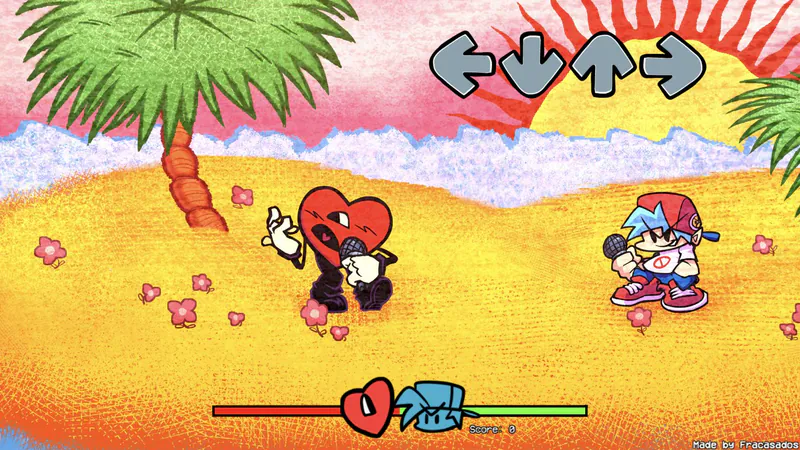
FNF Bad Bunny is the browser version of FNF: Feat. Bad Bunny, an original Friday Night Funkin’ mod week featuring the Bad Bunny character. The game credits Fracasados and sets the rhythm battle on a bright beach with palm trees, waves and a red heart opponent facing Boyfriend. The three-song set gives you a clear practice path. Celoso! is listed at 107 BPM, PALMAS at 105 BPM and amarre </3 at 120 BPM. Their different tempos give the week variation, but success depends on reading the actual chart and timing your presses. Hard is the difficulty shown in Freeplay and the only supported difficulty specified by the original submission. The browser menu includes Story Mode and Freeplay. Freeplay lets you choose a track or Random and compare attempts through the visible high-score display; during the battle, the score and health bar show how the run is progressing. Pause options include restarting a song, which is useful when learning a dense phrase. The original mod’s credits distinguish music, programming, art and chart work. atsigned is credited as director and musician, gamerbross as coder, Lucy4Realz for art and events, and Its_W1lson for charting and events. You can read the full credits and find the separate download on the original mod page. The web player and the downloadable release have different startup paths. FNFans hosts the browser build, while the original mod names V-Slice 0.8.6 or Preview 3 and includes desktop and mobile ZIP files. You do not need to install that engine to try the hosted player. A separate mobile download exists, but browser compatibility varies by device. For a look at the same mod’s songs and beach presentation, the gameplay video below shows a complete mod session. Use it to become familiar with the visual rhythm cues and opponent, then return to a named Freeplay track to practice the patterns yourself.
How to Play FNF Bad Bunny
Controls
Click Play Now above and wait for the browser game to load. Click the start prompt or press a key, then use Enter to reach the main menu. You can pick Story Mode or Freeplay. Choose Freeplay if you want a specific song instead of starting the full week. The Freeplay list shows Celoso!, PALMAS, amarre </3 and Random. Pick a named track for repeatable practice. Confirm the song and the Default instrumental choice, then wait for the stage. Freeplay shows Hard, the only difficulty supported by the original mod. Watch the four arrow receptors and press the matching lane as each note reaches its target. Boyfriend stands on the right, facing the red heart opponent on the left. The score and health bar give you feedback during the song. Focus on timing your presses with the notes instead of pressing rapidly when the music gets busy. For a first session, pick Celoso! and learn one phrase at a time. Its listed tempo is 107 BPM, while PALMAS is 105 BPM and amarre </3 is 120 BPM. Tempo alone does not decide difficulty: the chart’s note patterns matter, so a slightly slower track is not automatically easier. Use the pause menu when you need another attempt. It offers Resume and Restart Song, so you can repeat a track without choosing Random and changing your practice target. When a pattern keeps catching you out, restart the same song and focus on that section rather than changing every setting at once. Click inside the game area before using the keyboard, especially if arrow keys scroll the surrounding page. The game uses arrow keys or WASD for desktop notes. On a supported phone, look for on-screen arrows and give the stage enough room in landscape orientation. Touch controls work on supported devices, but performance varies. You can play the browser build without installing the original mod. If you choose the separate downloadable mod instead, follow its own requirements: the author specifies V-Slice 0.8.6 or Preview 3 and Hard-only play. Those engine requirements belong to the downloaded mod, not to the browser player above.
Game Features
- One original Friday Night Funkin’ Bad Bunny mod week with three named tracks
- Three tracks with distinct tempos: 107, 105 and 120 BPM
- Hard charts shown in the browser Freeplay list
- Story Mode and direct song selection through Freeplay
- Tropical beach battle with the red heart opponent and Boyfriend
- Four note lanes, a health bar, score and high-score display
- Pause, resume and restart-song menu choices
- One complete-mod gameplay video
FNF: Feat. Bad Bunny Gameplay Video
FNF: Feat. Bad Bunny FAQs
Where can I play FNF Bad Bunny online?
Click Play Now above, wait for the game to load and enter the menu. Choose Freeplay for an individual song or Story Mode for the full week. The browser player does not require a separate mod installation.
Which songs are included?
The Freeplay list shows Celoso! at 107 BPM, PALMAS at 105 BPM and amarre </3 at 120 BPM. Pick a named track to practice consistently, or Random when you want the game to choose.
Can I switch to Easy or Normal?
The original mod supports Hard only, and the browser Freeplay list shows Hard. A Change Difficulty option appears in the pause menu, but Easy or Normal charts have not been confirmed for this hosted build.
Do I need V-Slice 0.8.6 to use the browser player?
You can try the browser build above without installing V-Slice. The V-Slice 0.8.6 or Preview 3 requirement applies to the separately downloaded original mod, which also specifies Hard difficulty.
Can I play on a phone?
The browser version includes on-screen arrow controls on supported phones. Touch controls work on supported devices, but performance depends on your phone and browser.
What is the best way to practice one difficult section?
Pick the same named Freeplay song and use Restart Song from the pause menu for another attempt. Watch the note alignment and health bar; BPM alone does not tell you which chart will feel easier.